I Nuked My X History with a ZeroWork TaskBot
I wanted to start using X more actively. Not for "branding" or "growth hacking" - just personal engagement, building relationships, connecting with likeminded people, sharing what I'm building. You know, building in public.
I Just Wanted to Delete Old Tweets
My X history was flooded with hundreds of tweets and retweets after years of neglect. There were so many corporate social media sharing campaign posts, random competition retweets, and so on. None of that history represented the new image I wanted to portray on X.
But I've had my X profile for years, and I didn't want to delete it entirely.
So I needed to nuke my history.
This is where it got annoying. I looked around for tools to do this and found... third-party options. Sketchy-looking websites asking for my credentials. Paid subscriptions just to delete tweets. Nothing that felt safe or worth using.
(I don't know if I'm overly paranoid, but giving my X login to a random website doesn't sit right with me.)
I'd used ZeroWork before. I was pretty active in their community for a few months. Hadn't touched it in a while, but this problem sparked my interest in using it again.
So I built my own solution.
Automating with ZeroWork
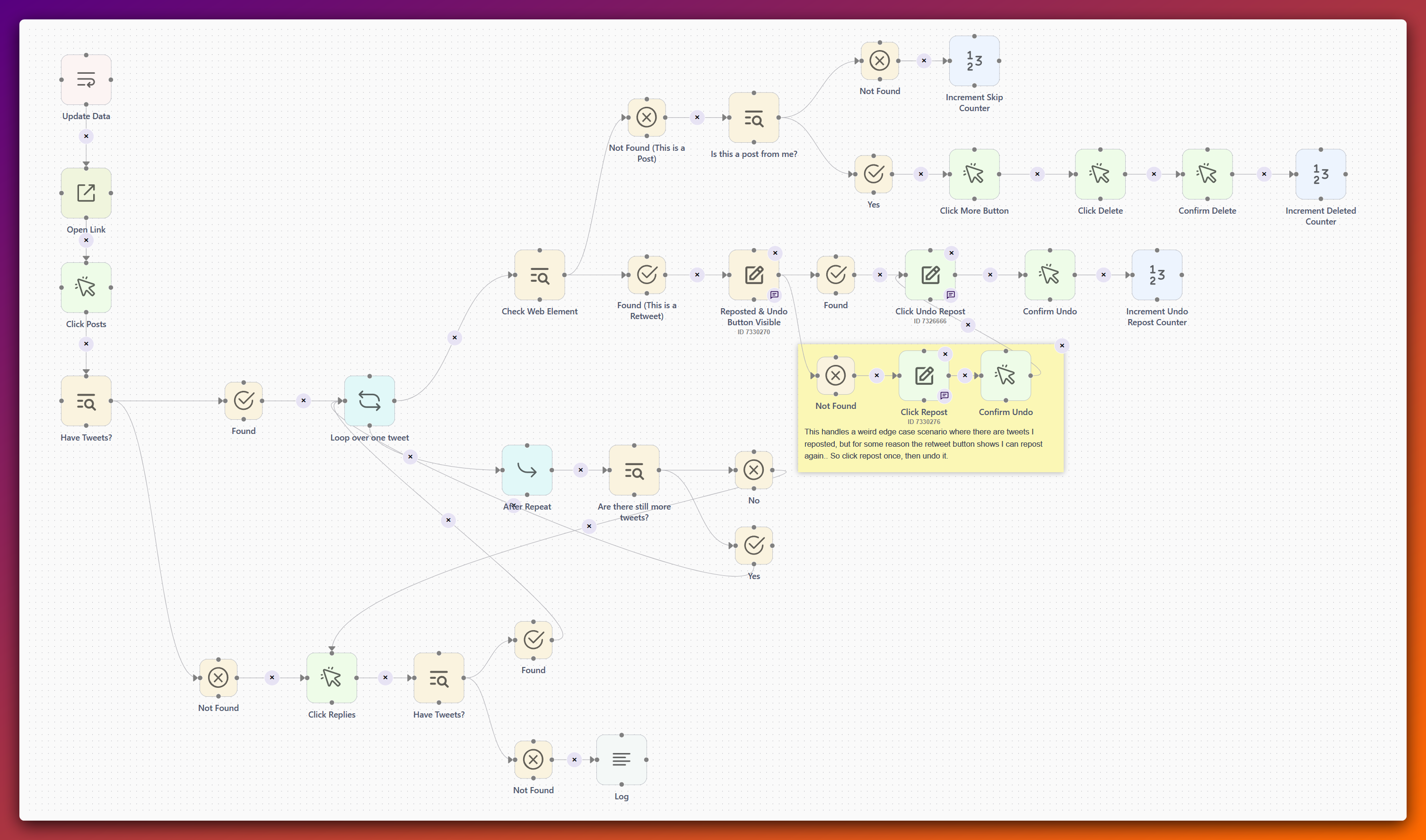
This automation completely cleans up your Twitter/X profile by automatically deleting all your original tweets and undoing all your retweets. Instead of manually clicking delete on hundreds of posts, this tool does the entire job for you in one go.
The process works like this:
- Opens your profile - It starts by visiting your Twitter profile page
- Checks your Posts tab - It looks at your main Posts feed first to see if there are any tweets to clean up
- Deletes/undoes every tweet:
- For retweets: It finds the "Undo Retweet" button and clicks it, removing your retweet
- For your own tweets: It clicks the more menu (⋮), selects "Delete," and confirms the deletion
- It tracks how many tweets it deleted and how many retweets it undid
- Automatically switches to Replies - If you don't have posts, it seamlessly moves to your Replies tab and cleans those up too
- Reports results - When it finishes, it tells you exactly what happened: "Posts Feed Done | X Tweets Deleted | Y Retweets Undone"
Key features:
- Handles both posts and replies automatically
- Distinguishes between your tweets and retweets
- Safe, deliberate process with confirmation steps
- Auto-scrolls to find more tweets as it goes
Getting the TaskBot to work reliably took way more trial and error than I expected.
The main thing that tripped me up was loop logic. If I set the loop iterations too high, it would randomly fail.
So I realized the best thing to do was limit the loop to a single tweet, then add an "After Repeat" block to check if there were still more tweets. A single loop per single tweet was way more reliable than trying to process multiple tweets per loop.
I also had to identify whether each object was a post or a retweet - the "delete" and "un-repost" actions are different, so I needed separate branches.
But that wasn't the weird part.
The Weird Stuff
Older reposts/retweets were confusing. For some reason, they showed up in my Replies feed as me having retweeted them, but there was no "Undo Retweet" button. This broke my workflow since I couldn't just undo them directly.
I figured it out relatively quickly: I had to repost the item again, then undo that repost. Only then would it finally get removed from the Replies page. This makes zero sense to me, but it worked.
Then there were replies. Handling tweets where either I was replying to someone, or someone was replying to me - these got mixed together in the feed. The automation would try to delete tweets that weren't mine, which obviously failed.
I solved this with a counter. My loop would always review the tweet at position zero. If that tweet belonged to someone else, I'd increment the counter, so it would review the tweet at position one instead. This way I could skip over other people's replies and only target mine.
It wasn't plug-and-play. I was pretty rusty on ZeroWork, and I spent many hours tweaking and re-running the TaskBot before it finally worked smoothly.
I let it run while I went to do other things. When I came back about 3 hours later, it had finished.
It had removed about 400 reposts and a few tweets.
Now I have a fresh X profile with 0 posts and 0 retweets.
That's it. Clean slate. Ready to start posting for real this time.